Tuesday, October 31, 2006

Windows Live Messenger 8.1 Beta

Windows Live Messenger 8.1 Beta


IPB Image

Windows Live Messenger goes beyond the traditional instant messaging (IM) service, enabling people to connect and share, with free PC-to-PC calls and inexpensive calls from a PC to phones around the world, video calling, easy sharing with Sharing Folders, and more.
Windows Live Messenger features the following improvements:
- Video Call
- Windows Live Call with Verizon Web Calling service
- Integration with Windows Live Messenger phones
- Integration with Microsoft LifeCams
- Shared Folders
- Offline Instant Messaging
- Windows Live Contacts
- Integration with other Windows Live Services


IPB Image

Latest Changes:

- Redesigned, smarter contact cards give you more data about and easier access to your friends
- Your display name, status and personalization roam with you to any computer
- Try PC-to-phone calling with two free calls to virtually any phone in the world
- Better server performance
- Automatic updates
- Improved sign-in performance


Windows Live Messenger 8.1 is an update to version 8.0 that contain key bug fixes as well as a few new features. What are the new features? * Improved Vista Compatibility * New Personal Expressions UI (Winks and Emoticon menus, etc) * New Personal Status Message options * A new branding platform * Improved re-authentication at sign in * Roaming display pictures * New platform architecture in key areas such as automatic updates and object store (where your personalized data is kept on your computer)


  • DOWNLOAD


  • Webroot Spy Sweeper 5.2.3 Build 2120

    Webroot Spy Sweeper 5.2.3 Build 2120


    IPB Image

    Webroot Spy Sweeper is award-winning anti-spyware software that effectively detects and safely removes spyware and adware from your PC. Spy Sweeper protects you from spyware's negative consequences, which include a slower Internet connection, pop-up advertisement problems, reduced computer performance, or in the worst case, the loss of private information and identity theft.
    Spy Sweeper™ lets you protect your privacy and your computer from a variety of spyware programs, from those that monitor all of your computer's activities (system monitors) to those that can steal or destroy data (Trojan horses). It also detects programs that pop up ads on your computer when the program is running (adware) and cookies that may contain and may transmit personal information (tracking cookies).

    Spy Sweeper™ "sweeps" your computer looking for evidence of these programs, reports its findings, and lets you decide whether to quarantine and remove the program or keep it running on your system. Quarantining and removing programs will disable it until you decide to delete the program completely or restore it.


    IPB Image

    F E A T U R E S :

    - Comprehensive Removal Technology.
    Using new patent-pending removal technology, Spy Sweeper effectively disables the most sophisticated and debilitating spyware programs, including threats that employ "rootkit" technology to evade detection and removal and continue wreaking havoc with your PC. This advanced and highly effective technology saves you time and effort by removing even the most vicious spyware threats in one sweep.
    - Advanced Detection Techniques.
    Spy Sweeper uses FlexDef technology to identify and defeat emerging spyware threats without having a direct match to an existing spyware definition or signature. Using this technology, Spy Sweeper is able to dynamically defend against threats as they emerge.
    - Enhanced Blocking with Smart Shield Protection.
    Spy Sweeper uses 16 advanced Smart Shields, including ActiveX, Toolbar, and Spy Communications shields that block new spyware installations so you can have the peace of mind you deserve knowing you've got proactive, always-on protection.
    - Deepest Detection.
    Using state-of-the-art spyware research methods that identify new spyware threats before they are widely distributed, Spy Sweeper ensures you have the most powerful and up-to-date protection against new emerging spyware threats.
    - Unrivaled Removal.
    Spy Sweeper's Comprehensive Removal Technology (CRT) is the backbone behind the most advanced spyware removal engine in the industry. CRT deletes the toughest spyware programs in just one sweep - even removing mutated or "rootkit" spies, some of the nastiest next-generation spyware threats.
    - Accurate Risk Assessment.
    Detected spyware programs are rated by risk level to help you understand the danger that each spyware threat poses to your security. Plus, Spy Sweeper gives you a quick overview of each threat, what it does, and its potential danger.
    - Continuous Security Updates.
    Spyware programs morph frequently. Spy Sweeper keeps you protected against these threats with frequent and automated updates to its definition database.
    - Protection Made Easy.
    Spy Sweeper continues to earn wide-spread acclaim for its user-friendly interface and usability. With an easy-to-use console and customizable options, Spy Sweeper makes defeating spyware a breeze.
    - Up-to-date News & Information.
    Webroot regularly provides essential information about spyware - right within your Spy Sweeper application. You can stay informed about the latest online threats.

    IPB Image


    Works with Windows 98, ME, 2000, XP Pro and XP Home.


    Changes in version 5.0


    Instantly stops spyware in its tracks
    Backed by free customer supportcolor">


  • DOWNLOAD


  • CRACK


  • RAR PASS: MR-BOLICA

    Internet Download Accelerator 5.1.1.1045 - Final


    Internet Download Accelerator 5.1.1.1045 - Final


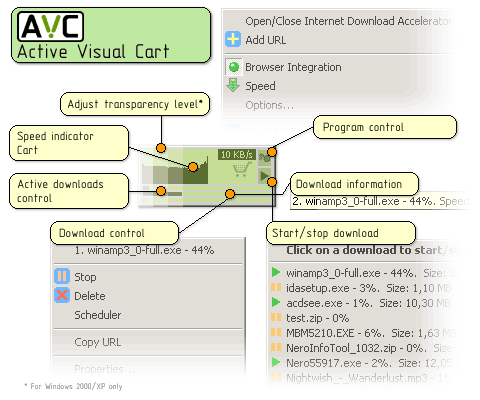
    Internet Download Accelerator lets you to noticeably increase the speed of file download from the Internet using HTTP, HTTPS and FTP protocols. The acceleration is achieved by splitting a file being downloaded into several parts and downloading these parts at the same time. Internet Download Accelerator resumes broken downloads from where they left off from both HTTP, HTTPS and FTP servers.
    To increase usability Internet Download Accelerator integrates with Internet Explorer, Firefox, Mozilla, Opera, Nescape and others, replacing the standard download modules. Morover, the program monitors the system clipboard and detects URLs in the clipboard. Whatever your connection type, Internet Download Accelerator will use the bandwidth of your connection most effectively and download files extremely fast.
    Power and useful tool for management of download categories. Possiblity of automatic file type detection with automatic file placement to the specified categories. Unlimited number of categories and hierarchy levels. With the site manager, you can automatically pass a user name and password to a server and specify a folder for saving files downloaded from a certain site. IDA also features import and export of the download list. International users are provided with multi-language interface option.

    IPB Image

    The program also contains:

    - FTP Explorer;
    - site manager for password and download folders management;
    - scheduler;
    - download speed control, automatic mode for the most comfortable browsing on the Web;
    - dial for dial-up connection;
    - search for files, programs, games, and music;
    - IDA Bar - a toolbar for Internet Explorer.


    Changes in Version 5.1 - October 31, 2006 :

    - Started a new file catalog IDATop.com;
    - Added "Find mirrors" option;
    - Added ability to add and view comments for a particular file;
    - Search for files, programs, archives and documents completely reworked;
    - Added new category section "Most popular" (Software, Archives, Documents, Search);
    - Added new menu item “Extract to … and open” to the “File - ZIP/RAR” context menu;
    - Floating window improved;
    - Reduced processor load;
    - Bugs fixed.


  • DOWNLOAD


  • Patch


  • RAR PASS: MR-BOLICA

    Symantec Client Security Corporate Edition v3.1.5.5000

    Symantec Client Security Corporate Edition v3.1.5.5000


    IPB Image

    Symantec Client Security 3.1 helps keep client systems safe by providing comprehensive and proactive protection against malware with vulnerability-based detection. Integrated graphical reporting and simplified management of multiple, integrated security technologies allow organizations to maintain control of client systems, minimize productivity disruptions, and enhance client security.
    Simplified management of integrated antivirus, firewall, and intrusion prevention technologies through the familiar Symantec AntiVirus Corporate Edition management interface allows organizations to maintain control of client systems, minimize productivity disruptions, and enhance client security.
    Real-time protection reduces the risk of spyware and adware reaching the system, while automatic removal enables easy disposal of security risks. Side-effect repair automatically cleans up registry entries, files, and browser settings after hard-to-find spyware infections. Administrators have the flexibility to set the organization's security spyware and adware policies on an application-by-application basis.

    Centralized configuration, policy management, threshold alerting, and logging capabilities ease the administrative burden and offer a comprehensive view of the enterprise's client security posture. A single update for antivirus, firewall, and intrusion prevention from a single vendor allows organizations to respond faster to complex security outbreaks. At the same time, multiple security technologies interacting with one another ensure a coordinated response to maximize containment and recovery.

    Key Benefits :

    - Automatically detects and repairs the effects of spyware, adware, viruses, and other malicious intrusions in real time to help keep client systems safe.
    - Vulnerability-based protection proactively defends systems before operating system patches or virus signatures are available.
    - Simplified management provides real-time information of network client status and fast distribution of software updates and definitions.


    Key Features:

    - Integrated security technologies—including antivirus, antispyware, client firewall, and intrusion prevention.
    - Generic exploit blocking enhances client intrusion prevention capabilities against unknown threats.
    - Default client firewall configurations minimize implementation efforts while stopping the majority of threats.
    - Integrated Web-based graphical reporting and centralized management from one single console.
    - Enhanced protection from spyware and adware, including:
    - - Real-time protection to reduce the risk of spyware reaching the system
    - - Automatic removal for easy disposal of security risks
    - - Side-effect repair to clean up registry entries, files, and browser settings after hard-to-find spyware infection
    - - Control over spyware settings via existing Symantec™ AntiVirus Corporate Edition management interface

    Symantec Client Security includes:

    - Cetral Quarantine Server
    - Cetral Quarantine Console
    - SAV fo x64-bit systems
    - SAV Client & Server
    - Symantec System Center
    - LiveUpdate Administration Utility
    - SClient Security Firewall Administration
    - SC Security Client
    - AMS


  • DOWNLOAD

  • Windows 98 Second Edition


    IPB Image


  • DOWNLOAD

  • Sunday, October 15, 2006

    Microsoft Windows XP Professional Corporate SP2 Integrated September 2006

    Microsoft Windows XP Professional Corporate SP2 Integrated September 2006


    IPB Image


    This release includes all hotfixes and security updates until September 2006.
    Only .NET Framework is not integrated.


    1. Unrar and burn with Nero
    2. Install using this cd-key:

    CODE
    CD-Key:XP8BF-F8HPF-PY6BX-K24PJ-TWT6M


    TORRENT LINK

  • DOWNLOAD


  • RAR PASS: MR-BOLICA

    WinXP Manager 5.0.0

    WinXP Manager 5.0.0


    WinXP Manager is a tool for setting, optimizing, diagnosing and tweaking Windows XP. It includes more than 28 different tools that will let you teak and optimize your system. You can tweak memory and CPU settings, customize IE settings, find and remove junk files, check and repair your registry, control startup programs, optimize your connection speed, validate your Favorites and much more. It also includes an Auto-Optimization option, that allows less experienced users to easily optimize certain settings, using a wizard. The interface is easy to use and all available options are categorized into sections. Includes basic documentation and an annoying nag screen that pops up every few minutes.


    Features and Benefits of WinXP Manager:

    - Information - Get detailed system and all hardware information on your system; show all detailed information of running processes and threads on your machine; WinXP Manager offers auto optimization feature for the user without having any advanced knowledge.
    - Optimizer - Tweak your system to improve windows startup and shutdown speed; monitor and free your Physical Memory; tweak your hardware to increase system speed and performance; disable some unnecessary services which start with windows; repairs Internet Explorer and certain other System Components to restore these functions.
    - Cleaner - Find and clean junk, unnecessary wallpaper and screen saver files to increase Hard Disk space; Registry Cleaner can easily checks your registry and repair incorrectly linked registry entries, automatically remove invalid entries; uninstall and logoff some installed programs.
    - Customization. Control what is started on Windows startup; edit context menus of mouse Right-Clicking; customize system desktop, menus, toolbar and notifications settings, change Windows logon background; change system icons; custom OEM information.
    - Security - You can improve desktop, menus, control panel, windows logon securities, and enable numerous hidden performance options of system, disable system updates and error reports; hide and restrict to access drives, specify which applications are not allowed to be executed on your computer; encrypt/decrypt and shred files, camouflage folder to hide its content from Windows explorer, change the location of system folders; Privacy Protector can maintain your personal privacy by eliminating the tracks that you leave behind; create lots of randomization password once.
    - Network - Optimize your Internet connection speed, manage all shares items, search for and find out opened ports on your system; Tweak your Internet Explorer easily; backup all data in Outlook Express; automatically check the invalid URLs in your favorites and parse domain name; Message Sender can easily send messages to others.
    - Misc. Utilities - Show the collection of Windows utilities; control your computer when you're not at home; apply XP visual style to any Windows applications; appoint logging on time of any account users.

    Changes in WinXP Manager 5.0.0, 10/09/2006:

    - .Net Framework 2.0 is necessary instead of v1.1
    - Adds Run-Shortcut Creator
    - Junk File Cleaner updated to v4.7
    - Wallpaper Changer updated to v4.0
    - Perfects lots of features.


  • DOWNLOAD


  • KeyGen


  • Adobe Photoshop Elements v5.0

    Adobe Photoshop Elements v5.0


    IPB Image

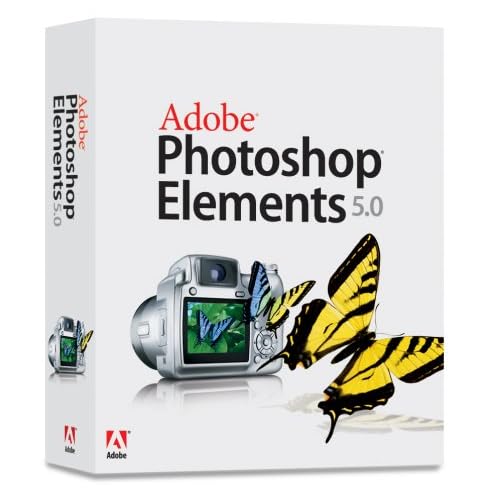
    Adobe® Photoshop® Elements 5.0 software combines power and simplicity so you can do more with your photos. Instantly fix flaws or adjust color and lighting with new advanced controls. Quickly drop your photos into customizable layouts and show off your creativity with dynamic web photo galleries created using Flash® technology. And view all your photos and video clips in one convenient place.


    Make quick fixes
    Perform a full range of common photo adjustments — including color, contrast, and lighting — in the convenient Quick Fix mode.

    Get realistic skin tones
    Easily adjust skin tones for a more natural look, even in poorly lit photos.

    Say goodbye to red eye
    Photoshop Elements now eliminates red eye automatically as you download photos from your camera. Or you can remove red eye from individual shots without even clicking on the photo.

    Compare changes in before and after views
    Instantly see the effects of adjustments you make with before and after views in Quick Fix mode.

    Correct color effortlessly
    Compare a range of color variations side by side with your original photo, and select the best choice with a single click.

    Automatically divide scanned photos
    Save time by scanning several photos at once. Photoshop Elements automatically divides, straightens, and saves each photo separately.

    Rotate and crop
    Turn photos right side up and crop out unwanted areas quickly and accurately.


    Perform advanced editing

    Quickly retouch specific areas
    Easily select by brushing over any element of your photo to make a range of adjustments to a specific area or object.

    Brush away flaws
    Easily brush away wrinkles and unwanted objects using the Spot Healing Brush for instant results and the Healing Brush for finer control.

    Control color temperature and tint
    Get the best overall color possible with easy slider controls for color temperature and tint.

    Easily adjust shadows and highlights
    Rescue poorly lit photos by lightening shadows and reducing the glare of highlights.

    Fine-tune exposure
    Adjust the exposure of specific areas in your photos using professional darkroom tools like dodge, burn, and sponge.

    Benefit from 16-bit support
    Get truer, higher quality results with support for 16-bit color.

    Fine-tune your camera's raw files
    Make adjustments to exposure and lighting by working with the original raw data files from your digital camera. Photoshop Elements now offers Digital Negative (DNG) support.

    Convert raw files to DNG
    Enjoy a lifetime of access to your raw files by converting them to universal DNG format, which means you'll be able to open and use your highest quality photo files without worrying about proprietary camera formats.

    Learn advanced techniques
    Spark your imagination and master advanced techniques by following the steps in How-To guides.

    Be creative in less time
    Start editing sooner with a quick-launching Editor mode.

    See the full color range
    Adjust the color range of any photo and see real-time changes in the Histogram palette.


    Artistically enhance photos

    Give photos extra dimension
    Add depth with drop shadows, bevels, glows, and other effects, which are automatically applied to any element placed on a layer.

    Convert to black-and-white or sepia
    Give your photos a classic look by instantly converting them to black-and-white or sepia tone.

    Instantly apply multiple effects
    Stylize your photos with hundreds of cool special effects. Easily mix multiple effects, change their order, and preview them in the Filter Gallery.

    Apply colored filters
    Create real-world photographic effects by applying tint filters that simulate colored filters on a camera.

    Simulate painting
    Transform your photos with realistic paintbrush effects to simulate oils, watercolors, charcoals, pastels, and different canvas textures.

    Add surreal effects
    Have fun liquifying your photos by easily twisting, warping, stretching, and pulling different areas.


    Create composites

    Combine photos with control
    Place a friend on a mountaintop, add ancestors to a family portrait, and create other fun combinations using flexible layers.

    Easily isolate objects from backgrounds
    Quickly separate an object from its background — even in complex, textured areas — and instantly remove rough edges.

    Erase backgrounds
    Magically remove backgrounds, leaving foregrounds untouched.

    Easily assemble panoramas
    Create seamless panoramas by automatically stitching together multiple photos with Adobe Photomerge technology.

    Try anything
    Experiment without worry, knowing you can instantly undo or redo multiple steps in one click.


    Add text and graphics

    Tell your story in stylized text
    Type titles and labels right onto your photos and edit them at any time. Easily choose typefaces from the enhanced font menu, which now displays characters for each typeface.

    Instantly add shapes
    Decorate your photos with geometric shapes, symbols, stamps, and thought bubbles from the built-in library, or draw your own.

    Add decorative edges
    Crop your photos into fun shapes with a single click of the Cookie Cutter, or frame them with hundreds of decorative edge designs.


    From the creators of Adobe Photoshop

    Use industry-leading technology
    Create top-quality images with software based on industry-leading Adobe Photoshop software. Professionals have relied on it for more than a decade.

    Process batches of photos at once
    Save hours of effort by automatically processing batches of photos. Remove red eye, rename, resize, convert formats, adjust levels, add text, and more.

    Make the most of Windows XP
    Take advantage of the full power and speed of your Windows XP system.


    Entertain friends with a custom slide show

    Easily tell a story
    In just a few clicks, create an entertaining slide show, complete with captions.

    Dazzle your audience with special effects
    Captivate family and friends with documentary-style pan and zoom effects, amazing transitions, and clip art decorations.

    Set the mood with sound
    Personalize your slide show by adding narration and multiple tracks of your favorite music — now with easier controls.


    Conveniently share photos and order prints online

    Share photos online
    Easily upload your photos to a personal online album that can be updated with new photos at any time. Family and friends can view your photos and instantly order prints.

    Order prints online with one click
    Turn your digital pictures into professional-quality Kodak prints with new one-click printing, or create a memorable hardbound photo book. Both are delivered directly to your door.

    Share printed photos in creative ways
    Easily upload photos to have professional-quality Kodak prints delivered to your doorstep. Or create your own calendars, greeting cards, and albums to print at home.


    Show virtually everywhere

    View photos on your TV
    Entertain a roomful of friends by showing photos and slide shows on your TV, either over a home network or from a video CD. Control the show using your TV remote.

    Animate photos for the Web
    Liven up your Web site by turning photos into GIF animations that you can preview within Photoshop Elements.

    Share photos on mobile phones and handhelds
    Keep in touch by instantly sending photos to friends' mobile phones, or take your photos with you on your Palm OS handheld.


    Send personalized photo mail

    Make it easy for friends to enjoy your photos
    Send photos within the body of your e-mail, not as attachments.

    Personalize your message
    Give your e-mail a personal touch by choosing a themed template or decorative frame and adding your own captions.

    Keep e-mail sizes small
    Photoshop Elements automatically optimizes your photos so they download quickly, look great, and won't overload your friends' mailboxes.


    Create your own calendars, cards, and albums

    Create a year's worth of memories
    Admire your photos throughout the year or create the perfect year-end gift by printing a custom wall calendar.

    Send a greeting card
    Celebrate any event with a personalized greeting card that features your own photo and message. Use themed templates or create your own.

    Assemble an album
    Create great-looking albums, ready to print. Just choose from a variety of themes and add your own captions.


    Enjoy flexible print options

    Make the most of your photo paper
    Quickly drop your photos into Picture Packages that let you print photos from your desktop printer in a variety of flexible layouts.

    Instantly add captions
    Add captions, dates, or other text to your print layouts with just a few clicks.

    Print contact sheets and labels
    Instantly print a contact sheet of your photos for future reference, or print sheets of labels using standard layouts.


    Easily find and view your photos

    Instantly organize by date
    Download photos from your camera and Photoshop Elements automatically puts them in the order you took them.

    Forget about renaming
    You'll never have to rename another file or folder, and you can organize your library the way you want so your photos are always at your fingertips.

    Categorize by tagging
    Easily tag photos with keywords that represent favorite people, places, or events. You can instantly view every photo you've ever taken of Amy, for example, by simply clicking on her tag.

    Find every face
    Instantly find all of your photos that contain faces so you can tag photos of friends and family for easy sorting.

    Group photos into collections
    Place your family, work, or vacation photos into collections to keep them together for special projects.

    Archive photos for safekeeping
    Easily preserve all of your photos, keyword tags, and projects on CD or DVD, with no additional software required.


    View photos the way you want

    See all your photos in one place
    View your photos in one convenient location — whether they're stored on your hard drive or on CD — automatically organized by date.

    Pick your best shot
    Zero in on the best of many similar photos while viewing them side by side using Photo Compare.

    View photos full screen
    Flip through photos in full-screen mode so it's easy to rate your favorites, rotate them, and mark them for printing.

    Put your favorites on top
    Cut down on clutter by stacking similar photos on top of one another.

    Know where your photos are
    Already created folders on your hard drive? Easily access your photos and add, delete, or move folders using the Folder View.


    Quickly find any photo

    Find photos from a special day
    Flip through photos taken on a special day using the convenient Date View. Browse by day, week, month, or year.

    View photos by time period
    View photos taken over a specific time period by clicking the intuitive Timeline.

    Search by metadata
    Quickly find and preview any photo, no matter where it's stored, with expanded metadata search parameters, including f-stop, digital camera model, and exposure values.

    Pinpoint your search
    Complex searches are quick and easy with the power of keyword tags. Instantly find photos that show only Jack, but not Jack and Jill, for instance.

    Search by usage
    Find photos you've used in a slide show, sent as photo mail, put on a greeting card or calendar creation, or used any other way.

    Search for similar photos
    Automatically find photos that share common characteristics, such as color, shape, pattern, or composition.


  • http://up-file.com/download/37a3f670601/zwt-adphshel5.rar.html">DOWNLOAD